Copyright and websites: What you don’t know can bite you

Websites have interesting copyright issues. Many people mistakenly believe that once they have paid for a website, they own it. Be sure to understand your rights as a website owner, and the rights owned by the website developer, photographer, videographer, the SEO company or the marketer that you hire.

If your website is on a site builder like WIX, OtherPeople’s Pixels, Blogger or WordPress.com, that company owns the copyrights for the design of your site, the plugins and other functional features, and all coding behind the site. They can terminate or remove your site from their server at any time without providing a reason.

If you purchase or download a template/theme/design for a website, the original developer of the template owns the copyright. You are simply purchasing a license to use their design. Check to see the conditions of use.

If you purchase stock photos for your site, you are purchasing only a license for use. You do not own the copyright to the photos. Check the licensing agreements for the terms of use. For example, you may be able to use the photos for a website but not for printed material like advertising.

You need a logo that can be sized up or down, used on websites and in print. If you have a logo designed for you, the designer owns the copyright to the logo. Before hiring a logo designer, check the cost of obtaining the original vector image or at least a variety of high-resolution images for use in different situations.

If your website designer/developer took the photos for your site, he or she owns the copyright to the photos. They cannot be used by you for print media, business cards or any other purpose, without the designer’s permission. They cannot be used by a different designer on another site without the previous designer’s permission.

If you have a custom site built, the developer/designer owns the copyright to the site design. If another developer, SEO expert or marketing person subsequently takes over the site and adds content or additional features to the site, they cannot change or replace the designer’s name in the footer.

If you have a custom site built, the developer/designer also owns the moral rights to the site. This means they can protect the aesthetics of their design by objecting to any changes you make to it. If you change images in a slider, for example, the new images must match the look and feel of the previous slides, and not affect the integrity of the design.

If you have a custom site built, neither the design nor the coding can be used on another site without the original designer’s permission. People with WordPress sites need to understand they can change the content, but not the design.

If you have a custom site built, the developer/programmer also owns the rights to the style sheets and other code that affects the site functionality. You cannot use their code on another site.

Because the site designer/developer owns the copyright to the site, designers can make as many sites as they like using the same design and coding. Be sure to check with your developer if your design will be original and used only for your own site.

Resources

Copyright issues in web design
http://mincovlaw.com/blog-post/copyright_issues_in_web_design

When a website design is copied
http://www.smashingmagazine.com/2009/12/18/my-website-design-was-stolen-now-what/

How to pursue website copyright infringement
http://www.sitepoint.com/theft-webmasters-recourse/

Posted in Global news & issues, Wordpress news | Leave a comment

How often should you change your website?

Some people change the appearance of their website every few months, while others keep the same site for years. This article discusses the pros and cons of updating or replacing your website.

Until recently, people with professionally developed websites were likely to keep them for three years or more. Many really good HTML sites have stood the test of time since 2003 or 2004. These early sites are smaller than sites built today, but have all the hallmarks of solid design and thoughtful information architecture.

Two years ago, we began to notice that designs we had built only months previously were being replaced. Not just the design, but all the content thrown out and replaced within months. In an informal survey of showcases for the “Best Websites of 2011”, we found the majority of sites selected as winners in late 2011 had already been replaced with completely new and different designs by early 2012. Now we are seeing the same trend with award-winning sites from 2012 being replaced with completely new sites in 2013.

Why are new sites being changed so frequently?

Web technologies have changed enormously in the past few years. Many people moved from HTML and Flash sites to content management sites built on platforms like WordPress or Joomla so they can do their own updating. Companies with Flash sites were forced to re-do their sites when Apple didn’t support Flash on the iPad and iPhone. People who used free platforms like WIX discovered they couldn’t do SEO work, their sites couldn’t be verified by Google (utterly critical to getting indexed and showing up in a search) and their site didn’t display on iPad and iPhone.

Most people today are redesigning their sites to adapt to mobile devices. Many companies built micro sites specifically designed for mobile, but micro sites have in turn become redundant with responsive web design in 2012. Most of our work in the past year has been spent on designing responsive websites, where the content not only scales down but the layout of the content changes on smaller mobile screens.

WordPress is currently is the number one site-builder, and people with WordPress sites frequently change their designs. One reason is that WordPress allows you to change the “theme” or design of a site while keeping the content, menus and plugins intact.

We also see a fast turnover in WordPress design as a result of owners altering their sites. Not just adding content, but fundamentally altering the layout and design. Several expensive sites we built this year were immediately re-designed by their owners upon completion, simply because the owners wanted to try their own hand at “changing it up” – hacking the responsive designs, breaking links, altering URLs and installing incompatible plugins. WordPress makes it easy for anyone to alter their site design, but the ease comes with consequences and the sites subsequently have to be re-built.

Other people just seek constant change. We’re contacted several times a month by people asking us to look at their sites and tell us what’s “wrong” with them. In most cases these sites have only recently been completed.

In other cases, site owners are approached by “SEO experts” who just plain wreak havoc on a site, drop user-friendly features and greatly change the appearance to the detriment of proper usability and visitor experience.

Sample of website that has been copied and hacked by “SEO experts”

What’s wrong with changing your site as often as you feel like it?

Rebuilding your site too soon, especially if you don’t retain the same URLS, can be disastrous for your search engine results. Search engines need a good couple of years to make a profile of your site and a cache of back links (referring sites). In turn, referring sites can take months and years to acquire. When search engine optimization is done properly and organically, it takes time to “grow” the SEO effectiveness.

One of the most valuable features of an older site is your Google Page Rank. Page rank takes years to build. Even when using 301 re-directs to ensure continuity between your old URLs and your new URLs, you will lose page rank. With the current competition for Google’s attention, you are probably giving up more than you can ever acquire again.

Another valuable resource is repeat visitors. Repeat visitors are worth gold, and they may not be very happy to find your site changed. How often have you re-visited a site for a specific reason, only to find it’s been moved and you can’t find it? Or the page you need has been deleted? Or it looks like an entirely different business?

Branding refers to the process of building up recognition and trust with your visitors. If you follow large sites like Amazon, Old Navy or The New York Times for a while, you will soon see that despite all the money they could spend on new web design, their design alterations are done gradually and carefully so repeat visitors are not confused or annoyed.

For the sake of search engine continuity and branding, we often encourage new clients to keep their sites as is, perhaps with an updated heading, a slide show, or some social media links – features that will improve the visitor’s experience, but not necessarily at the expense of throwing out the whole site or changing the URLs.

So when should you change your website?

We recommend changing a site for the following reasons:

1. When the technologies used for your site are no longer compliant with modern web standards.

2. If your site is on a host or site-builder that does not support search engine optimization. Converting to WordPress is the best thing you can do for your search engine rankings.

3. If your site does not display well on mobile devices such as cell phones and tablets. When your market depends on visitors connecting through mobile devices, it’s time to move to a responsive design.

4. When you need a content management system to be able to add content yourself. If you need to frequently update your site content or want to start blogging, WordPress is the format of choice.

5. If you want to add features that are most easily done using plugins and widgets on a content management site. Building forms, calendars and other functional features from scratch on html sites is considerably more expensive and time-consuming than installing and modifying plugins on a CMS like WordPress.

6. If you need to increase your visitor interaction. Through the use of social media plugins, newsletter signups, visitor polls, Google maps and share widgets, content management platforms like WordPress offer valuable opportunities for increasing your social interaction with your visitors.

The best way to replace your site

When you replace your site, our best advice is to keep the following features intact for the sake of search engines and visitors.

1. Keep the same names for the URLs of the pages.
You want to retain all the search engine benefits your old site has gained, especially if your site is well-indexed on Google. Find out if your site has been well indexed by typing “site:www.mysite.com” into a search box.

2. Add re-directs.
If the URLs of important pages have changed, be sure to re-direct them to the new pages so visitors who bookmarked your site don’t get error messages.

3. Keep your GA ID
Keep the same Google Analytics number by transferring the code to the new site.

4. Contact your referring sites.
If you change your domain name, even slightly, do a links search to see who is referring your site, then contact the designers or webmasters (typically in the footer) and ask that your old domain name be replaced with your new one. To find your referring sites, type “links:www.mysite.com” into a search box.

5. Keep the most popular features of your site.
Check your Google Analytics to see what pages or content has been most popular. If you really don’t want to keep these pages, phase them out gradually from the new site rather than dropping them altogether. Remember that repeat visitors are a valuable commodity.

At Kits Media we believe that websites built with the latest technologies should support the addition of more pages and more features over a period of time. They should be carefully managed and monitored for visitors, search terms, back links, malware and updates during this time. We believe websites are most successful when they start with a long-term plan, and we welcome clients with the same approach.

RESOURCES

http://thenextweb.com/dd/2012/10/28/10-tell-tale-signs-that-your-website-may-need-a-redesign/
Comprehensive list of reasons to change your site design

http://www.thesitewizard.com/domain/reclaim-website-from-bad-web-designer-host.shtml
Excellent cautionary tales and tips for moving your site to a new host, retaining dynamic pages, changing urls and more

http://www.webpagemistakes.ca/301-redirects-what-you-need-to-know/
What you need to know about website re-directs following a site re-design

http://www.marketing-jive.com/2012/04/12-website-redesign-tips-for-2012.html
Outlines a plan for managing the goals, functionality and appearance of a new site design

http://www.slideshare.net/shuey03/redesigning-your-website-when-why-how-seocom
Video presentation discusses when, why, and how you should redesign your website for both search engine crawlers and end users.

http://www.thesitewizard.com/webdesign/important-site-redesign-tips.shtml
This older article provides some still current advice on changing the design of your site.

Posted in Computer tips, Personal thoughts, Wordpress news | Leave a comment

WordPress updates to version 3.5

On Monday, WordPress released version 3.5 and everyone with a WordPress site on a commercial server needs to install the update. Updates are important because they fix security breaches in the previous version. If you don’t update to the new version, you are leaving yourself open to attack by hackers who are quick to leap on opportunities. If your host does not do backups, you could lose all your files – and there will not be a copy to restore.

We will be contacting our clients during the next week to arrange updates. If your site uses a lot of plugins, you ideally should ask your developer to do the updates for you. At Kits Media, we charge $45 to make a backup copy of your files, make screenshots of your pages, disable the plugins, install the latest version of WordPress, re-activate your plugins one by one, replace any that do not update, and ensure your pages are intact and ready to go.

For more information, please read WordPress updates.

Changes in the gallery interface
If you have gallery plugins on your site, you will notice a dramatic difference in the appearance of the interface after we install the new version. Instead of appearing in a list, the thumbnails are in a grid. Instead of showing only the images associated with that page, WordPress by default displays all thumbnails in your Media Library.

Go to the page you want to edit and click on the media icon. Then open the image below and follow the instructions:

1. To see the files already on this page, select “Uploaded to this page”
2. Click the image you want to edit
3. Type the caption
4. Type the description

5. To add a new image, select “Upload files” instead. A different interface will open. If you have the file visible on your desktop at the same time, you can just click down and drag it into the space provided. Otherwise use “Select files” and browse for the new image.

After the image uploads, type the caption and description before saving changes. Or just upload the image, then return later to the “Media Library” page and follow steps 1-4 to edit the captions and description.

Note: Numbers refer to instructions above.

Posted in Wordpress news, Working with images | Leave a comment

Pros and cons of cloud computing

There’s a lot of pressure today on businesses to adopt cloud hosting for both daily office work and websites. Cloud computing means that instead of knowing exactly where your software, documents and website files are located – on a server in a building on a street in Burnaby, for example, or in Utah or Ontario – your files are distributed and accessed from computers spread around the globe.

Cloud computing is heavily marketed for the following benefits. Companies can reduce their capital costs on hardware, software and licensing fees, and owners of large corporate websites may experience faster access and streaming of their content. The financial model for web hosting shifts from a static annual or monthly charge to a pay-by-use model. The cost of software and complications of local area networks are handled by the cloud host’s data centres, rather than your company’s IT people. Cloud computing offers expanded opportunities for wireless computing: because all applications and documents are globally distributed, they can be accessed from anywhere in the world that has wireless access.

But I have a lot of concerns about cloud hosting and I’m not alone. In August, Apple co-founder Steve Wozniak expressed his own concerns about cloud hosting. This is from an industry leader whose own company has been one of the most prominent in the promotion of cloud computing. And many people agree with him.

At least with a host like Bluehost, right now we know your web files are stored on a server in Utah. They have a physical location and address. With cloud hosting, some could be on a server in England, some in Bangladesh, some in China – wherever a server is available at that split second.

Cloud-hosted companies assume a greater risk as a result of the many additional resources and connections required. When data is stored on multiple servers, often spanning several countries, issues quickly arise when any particular data centre is compromised. There are also issues around standardization, since there are no proper international standards for cloud technologies at this time.

There are also — and most importantly — huge security issues. Some of our clients express concern about the Privacy Act and hosting on an American server, but cloud computing is much worse. You really have no control over your files – they could be anywhere, including most third-world countries. The development of cloud computing resources in third world countries is increasingly encouraged and supported by large Western corporations. In return, there is an exponential increase in the number of people with permission to access the passwords and firewalls, and an increase in opportunities for hackers.

A good summary of the security issues is provided by Kurt Johnson in his article, Cloud Computing Hides Big Issues in Corporate Data Sharing on forbes.com.

Long before cloud computing, companies were sharing vital information with customers, partners, vendors, and contractors to make business processes run more efficiently and economically. They started with Web commerce, then moved into mobile applications and social networking. Each new information-sharing program opened up another hole in the corporate information security armor.

Cloud computing is another step on the continuum, and it also raises the stakes. Hosting vital data and applications on a cloud provider’s infrastructure puts vital information outside the corporate wall. Even more importantly, it creates a new set of users who have full access privileges to your data and applications — namely the cloud service administrators.

Too often, without realizing it, they rely on nothing more than trust to keep their data safe. They trust that the right people have the right access to vital information and will use it for the right things, yet they don’t really know who they’re trusting because they don’t know who all of those users are. Their service provider tells them to trust that they are managing user access effectively. Trust, in this context, is a flimsy defense.
http://www.forbes.com/sites/ciocentral/2012/02/17/cloud-computing-hides-big-issues-in-corporate-data-sharing/

Read more:

To Cloud or Not to Cloud – Pros and Cons
http://www.starktalent.com/tag/pros-and-cons-of-business-cloud-computing/

The Cloud and Africa: Indicators for the Growth of Cloud Computing
http://theafricanfile.com/ict/the-cloud-and-africa-indicators-for-growth-of-cloud-computing/

Cloud Computing: The Business Persepctive
http://www.acc.ncku.edu.tw – PDF

Cloud Computing Pros and Cons
http://epiclaunch.com/cloud-computing-pros-and-cons/

Cloud Computing Pros and Cons for Small Biz
http://www.cloudproviderusa.com/cloud-computing-pros-cons-small-biz/

Posted in Global news & issues, Personal thoughts | Leave a comment

Fake renewal orders

A new “fake” renewal notice for website owners is circling the Internet, giving the Domain Registry of Canada a run for its money. (The Domain Name Registry of Canada is infamous for its official-looking postal mail which arrives in recycled paper envelopes similar to those used by the government, with a Canadian flag as logo.)

Be very careful never to click on a notice that looks like the one below, or similar. ALWAYS check with your web developer if you’re not sure if your account is due. You risk losing both your money and control over your site online, because your DNS may be changed as a result.

(We did think the “sent” date of December 31, 1969 was a nice touch though. This date marks the launch of the UNIX operating system and is often used by viruses.)

Posted in Scams and alerts | Leave a comment

Crowd-sourcing a logo with 99 designs

99designs.com is a crowdsourcing site for graphic design. Crowdsourcing means that designers across the globe compete for the winning design. In the process you receive dozens and possibly hundreds of designs. Several of our clients have been very successful securing a logo through 99designs, so we decided to try them ourselves.

You start by signing up for an account then answer questions about the style of logo you want. Visual examples as well as value scales are included. You can write a description of the logo you envision, and upload sample images. 99designs then asks you to choose the amount you want to pay. We decided to start with $299 and see how it went.

Each contest lasts 7 days. The first stage lasts 4 days or 96 hours. After receiving about 20 different logos in 24 hours, we were asked to “guarantee” the money to encourage more designers to participate. This meant we agreed to pay for at least one of the logos by the end of the contest, which definitely seemed fair.

Early samples of logo designs from 99designs.com

The designers who participated in our contest came from the east. The majority were located between Bulgaria and Malaysia. Most submissions came in during the night while we were sleeping in Vancouver.

99designs encourages you to look at completed contests and to invite designers whose work you like. This was extra effort but very worthwhile. I opened about 40 contests and looked for designs I liked. Most contests in the $299 range had an average of 20 designers per contest, with an average of 60 designs each.

When I saw a design I liked, I linked to the artist’s portfolio to see if I liked the other designs. In all, I contacted 31 designers and asked them to look at our project. About 15 people I did not contact also supplied designs. We felt I substantially increased the odds of getting a good design by inviting people, rather than leaving the contest to chance. $299 is at the low end of the scale for a logo design.

You can rate each design with one to five stars, but can chnge your ratings any time. I found this useful for organizing our favourites. You can also write the designer directly about each design, and give feedback or ask for small changes.

I had described us as a website development company in Kitsilano interested in symbols to do with computers, the ocean, mountains and/or trees. There were strong cultural differences in subject matter. Designs came in with palm trees, tropical sunsets and Caribbean-coloured oceans. Most of the mountains were very pointy, like volcanoes or the Himalayans. If I did it again, I would provide mainly visual samples instead of text.

Samples of final entries from among the 320 submitted

We were amazed and astounded by the talent of the participants. When you work with one designer, you might go through 10 or 20 variations before the designer gets fatigue. By crowdsourcing the logo, more than 25 designers were able to participate and to bounce off each other’s work. (Although this was a bit of a calamity when one of them would use the wrong colour scheme or a palm tree and others would copy it.)

At the end of 4 days, we had 198 entries from 25 designers – more than twice what we had anticipated. We chose 6 finalists (who together had created about half of the entries). We also chose 6 designs and posted voting contests on Facebook to get feedback from other people.

During the final three days, the 6 finalists continued to produce variations on their ideas. At this point the designs became quite similar. We ended up with 320 designs, and eventually chose one that had been created early in the contest. You can see the winning logo at the top of this page and a white version of it in the footer below. It was an excellent experience and I highly recommend 99designs if you’re looking for a logo.

Posted in Global news & issues, Personal thoughts, Working with images | Leave a comment

Why your emails get blocked

If your emails are getting blocked or sent to a junk folder, the problem is not with your server. For example, if you host with Bluehost, this is not their problem. The problem is with the restrictive controls of the recipients’ email programs.

Email programs will typically block email for the following reasons.

- Restricting email addresses that start with a recognizable name, like “pam” or “mary” or “peter”. This indicates a setting in the mail program that is more restrictive than normal.

- Restricting the sender’s domain. The domain name itself may be banned, so any mail coming from “mycompany.com” will be marked as junk or spam.

- Rejecting mail from non-existent domain addresses

- Accepting mail from trusted networks only – for example, mail from “info@petsRus.com” may be accepted but mail from “www.girlsRus.com” may not be, if “www.girlsRus.com” is on a list of networks your mail server doesn’t trust.

- Rejecting mail because of unrecognized attachments

- Rejecting mail because of attachments that are too large – typically, images over 2 or 3 MB might be rejected. Images over 7 MB will likely not even leave the sender’s mail box.

Because there are so many email programs, there is not much you can do about your emails getting junked. They all have different settings and different standards for what they accept and what they don’t accept.

It’s good practice to check your Junk mail as often as you check your Inbox, and mark each blocked email with your approval.

Different email programs have different ways of handling approvals. If I want to approve a sender I find in my junk mail in Windows Live Email, I right-click the sender’s email, select “Junk mail” from the pop-up menu, then select “Add sender to safe sender list”. If I expect to receive more mail from the same domain (like from other people at the same company), I’ll select “Add sender’s domain to safe sender’s list”.

Encourage your recipients to do the same with your own messages. If your emails don’t get answered, try giving them a phone call and see if it’s in their Junk, then explain how they can mark it safe for the future.

More information on sizing images for email

Be wary of emails from “Faceboook”

Posted in Computer tips, Scams and alerts | Leave a comment

The case of the scammy website “company”

I often think that the internet must be a world of confusion for the average person. I was reminded of this today when we received an email from a woman named Lynn. She had written to one of our clients to ask what they thought of their web designer “Mark”, and fortunately we were sent a copy of her email.

There is no “Mark” working at Kits Media. We built the client’s site and have managed it for three years. In fact, we’ve spent the past three months re-building it, and are still working on the database development every day, so we were a bit surprised to hear someone named Mark was working on it too.

I told her we were the web designers, and I wondered where she got the name Mark. She kindly wrote back and told us she had been contacted by a web developer who offered to build a site for her. He had given her the name of our client’s site as an example of his own work.

It didn’t take us long to look up Mark’s company. We actually found three versions of it in a short time, each with a different domain name. (I would tell you the domain names, but there is a Trojan horse attached to the homepage of each one.) The samples in their portfolio looked real as well, until we took a closer look and discovered they are all bogus.

All three sites have the same phone number, and I imagine there are plenty more of their fakes sites out there, besides the three we found. A man with a heavy East Indian accent answered my call. In the background I could hear many other voices. I had obviously reached a call centre. After many questions and much prodding, I determined that the company itself is a telemarketing company. They finally admitted that they call people who do not seem to have a website and market to them, in part by providing a list of names of sites that “they” had built (our client’s was one of them) and also by directing unsuspecting people to view their portfolios on their fake sites.

Their portfolio contains examples of companies that are apparently in our geographic area, which added to their air of authenticity. We then noticed they’re running a script on the homepage that determines our IP (Internet connection) and delivered local examples. If we lived in Calgary and connected to their site, we would likely be sent files showing Calgary businesses. If we lived in Philadelphia, we would probably be shown examples of businesses in Philadelphia. So no matter where you live, their sites are going to look quite “real” to you.

Lynn was very smart to contact our client’s website and ask for a reference. Many people would accept this scam on faith – after all, the samples look good and are plausibly regional. Fortunately we were able to sort it out for her in a short amount of time.

What does Mark’s company really want? I imagine they would like a nice down payment, to begin with. They will likely offer very reasonable terms for the balance, which they will never collect because… before asking for the balance, they will likely sell you on some SEO (search engine optimization), take your credit card information, and explain how they will get you #1 on Google by charging your card $400 a month. I suppose if they spin out the delivery of your site long enough, they could collect two or three months’ worth of SEO payments in addition to the down-payment for the site. Plus they would have your credit card number and a direct route to cleaning it out.

Posted in Scams and alerts | Leave a comment

Graphic designer or website developer?

You are planning a new website and wondering whether to use a graphic designer or a web developer. What’s the difference?

Most graphic designers have extensive knowledge and experience with print media. That is, they understand how to work with files that have large file resolutions, to align text and images in grids using desktop publishing programs, and make color separations and master pages. They can set CMYK and Pantone colour specifications for digital print production, and prepare files for traditional printing companies.

A lot of graphic designers wish to add on to their skills and attract new clients by offering web design as well.

Unfortunately, the layout and design of your site depend on many factors that have nothing to do with its graphic design. Websites are created like jigsaw puzzles, not like posters. Think of them as many different pieces that are assembled in the browser via coded instructions, rather than a grid or layout program. The design needs to be planned by someone who understands how the design elements will work in the context of headers and footers, content areas and sidebars, as well as menu structures, widgets, plugins, tags, categories and scripts. Knowledge of web fonts – as opposed to typography – is also vital.

To create a website, a graphic designer needs to be familiar with optimizing files for the web, so they transfer quickly over the Internet and web pages load quickly. The content must be prepared for flexible images and fluid grids, because text and images on websites re-size according to the dimensions and orientation of each visitor’s monitor or cellphone. (You have to plan for people turning their iPad sideways, among many other considerations.)

In other words, a web design is not one single page, but multiple areas all coded separately. To be search-engine-friendly, all areas of the website need proper image titles, alt tags, css style sheets and media queries. Experienced web developers further test for differences between current browsers and older versions of browsers, including IE 7, IE 8, IE 9, Firefox and Chrome as well as Safari. They also understand (or should) how servers work and the most recent server technologies.

If you want your site to work efficiently on all devices, and for people to find it on the Internet, you need someone with the knowledge and experience of a seasoned website designer. This is not to say a graphic designer won’t succeed at getting something visible on the Internet  –  after all, anyone can make a website, just like anyone can cut your hair. But you may not reap the benefits of a site made by someone who understands how websites are interactive and configure themselves differently on different monitors and in different browsers.

There are some areas where you might use the services of a graphic designer to prepare files for your website. For example:

- Have a graphic designer create your logo. The logo will likely be used extensively in print media, so it’s best to have it created in the first place by someone who understands printing. It can easily be adapted to the web, but an image prepared for the web cannot be adapted to print media.

- For the same reason, a graphic designer could likewise prepare any elements of the website that will be used on business cards and brochures.

In addition:

- Be sure he or she understands the conventions of naming structures for Internet images, such as no spaces or symbols in the file names.

- If a graphic designer prepares images files for you on a Mac, be sure he or she understands the differences between how websites display on PCs, tablets and cell phones, in addition to how they look on Mac desktops, laptops, iPhones, iPads etc. There are profound differences in brightness and contrast.

Read more about differences in monitors and testing for different browsers

Additional reading

Why graphic design isn’t web design
http://blog.basekit.com/2010/08/05/why-graphic-design-isn%E2%80%99t-web-design/

Who should design your website?
http://www.ashwebstudio.com/articles/who-should-design-your-website/

7 Secrets Graphic Designers Won’t Tell You about Effective Website Design
http://blog.kissmetrics.com/graphic-designer-secrets/

How Much Code Should Web Designers Need to Know?
http://speckyboy.com/2012/03/22/how-much-code-should-web-designers-need-to-know/

Posted in Personal thoughts, Working with images | Leave a comment

CAPTCHA-solving sweatshops

I get pretty bristly when I think about people being paid to put annoying stupid and illiterate comments on blogs, in the hopes their comments will be approved and thereby create a link out of your site to one of theirs. Yet all over the world, especially in India, Malaysia, China and Russia, there are tens of thousands of low-paid, non-English speaking workers hired for a pennies a day to decipher the CAPTCHA code on WordPress comments.

The purpose of a CAPTCHA code on a website is to ensure that automated spam cannot reach you, because only humans can read the letters and numbers and type them out. So to get around the CAPTCHA codes, companies in third-world countries have enlisted the help of real humans to do just this.

With the going rate ranging from 80 cents to $1.20 for each 1,000 deciphered CAPTCHAs, a really fast worker can make $2 to $3 a day. Imagine deciphering 1,000 CAPTCHAs in one day, then doing it again for the next 365 days.

International CAPTCHA-solving teams are “effectively sweatshop labor, where people will just sit and be given these images to solve and will type them in all day.”

In India, major CAPTCHA-solving companies advertise their services freely to companies selling search engine optimization (SEO), Viagra, vitamins and others who can profit from getting a link on your site. Typical newspaper ads read:

I have 40 PCs and 55 Persons working in my office for data entry work. As 1 person can do 800 captcha entry per hour. We can deliver you good quantity with quality

Hello Sir, I will kindly introduce myself.. This is Shivakumar. We have a team to type capcthas 24/7 and we can type more than 200k captchas per day

WE ARE PROFESSIONAL CAPCHA ENTRY OPEATORS AND WE CAN DO EVEN 25000 ENTRIES PER DAY AS MY COMPANY IS A 25 SEATER FIRM SPEALISED IN DATA ENTRY

In Bangladesh at this very minute, a team of international workers is actively soliciting deals for breaking Craigslist, Gmail, Yahoo, MySpace, YouTube and Facebook’s CAPTCHA scripts, promising to deliver 250k solved CAPTCHAs per day on a “$2 for a 1000 solved CAPTCHAs” basis.

Sources:

http://www.zdnet.com/blog/security/inside-indias-captcha-solving-economy/1835

http://www.nytimes.com/2010/04/26/technology/26captcha.html?src=me&ref=technology

http://www.npr.org/templates/story/story.php?storyId=130594039

Posted in Global news & issues, Scams and alerts | Leave a comment

Nasty Facebook notifications

Some days I feel like I’m walking through a minefield.

No sooner had I posted a blog piece about WordPress comment spam today (see Caution: WordPress Comments), I noticed an email message from someone who had commented on my Facebook wall.

It was a weird comment, which should have warned me. After the fact, I also saw the tell-tale row of multiple O’s in the sender’s address, from comments@faceboook.com

But at the time, I was seduced into logging on to my Facebook account then clicking the link with a message from “Amanda Phillips” in my email program. At a quick glance it looked like any of the legitimate Facebook notifications I receive every day. (Without the swearing of course. In fact that was part of what intrigued me: Why was someone so mad at us?)

Curiosity almost killed the cat. I was immediately blasted by my Avast anti-virus/anti-malware protection which announced it had blocked an executable Trojan horse, a split second after clicking the link and a hair before it initiated.

Close, very close.

[BTW If you don’t have an anti-virus program, I urge you to stop now and download Avast here. http://www.avast.com/en-ca/index You will be very glad you did. Avast is also available for the Mac at http://www.avast.com/free-antivirus-mac As the market share for Mac grows, viruses are an increasing threat for people on Macs.]

What does a Trojan horse do? A Trojan horse is a program that gives a hacker power over your computer. It can provide the attacker with unauthorized remote access to a your files, infect your files and damage the system, carry additional dangerous parasites, and steal sensitive information. Trojans delivered to your computer through email can be are set in action when you click an infected link, play an infected video or click on an infected image. Without protection, they can wipe out your harddrive and all your programs and files.

More information about Trojan Horses can be found at Wikipedia

Read more about Facebook scams and spams at http://www.theregister.co.uk/2012/05/06/social_network_spam/

If you fall for one of these notifications like I did, I hope you have as excellent malware protection in place as I did.

Posted in Scams and alerts | Leave a comment

Caution: WordPress comments

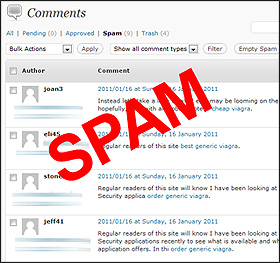
Think twice about accepting comments on your blog. Most WordPress comments are spam. Disguised as notes of appreciation, millions of spam comments are sent every day to WordPress blogs like yours and mine.

Most comments are innocuous, like the one above. Typically they read as a variation of:

“Great article. Keep up the great work.”
“You are very astute to write about this matter.”
“Spot on with this write-up, I truly think this fabulous website needs considerably more consideration.”

The goal of most of these senders is to have you approve their comments so they increase the number of links to their own sites. The scammers who generate these comments (by the thousands) are happy if only a fraction are accepted. But by approving them, you can be allowing potentially dangerous links to be created between their site and yours.

The more dangerous comments contain links to malware/virus/phishing sites, but you may not be able to tell by the email of the sender or other clues. Not only can you infect your own computer by accepting them, but the computers of your own visitors who may clicks on a malware link.

Other comments are much more damaging. Approving them can corrupt all the files on your site, including your design and all the posts you have made. You can lose everything. In a particularly brutal example, this morning someone contacted our company for help because he had approved a comment on his site which turned out to be malware. By approving it, it wrote malware into every .php file in his installation, installed someone else as the admin, and changed the admin e-mail address to their own. Basically he lost his entire site. He is on a server that does not do backups. This is one of the worst cases we’ve heard of.

Following are the absolute least, the most basic things you must do to protect yourself.

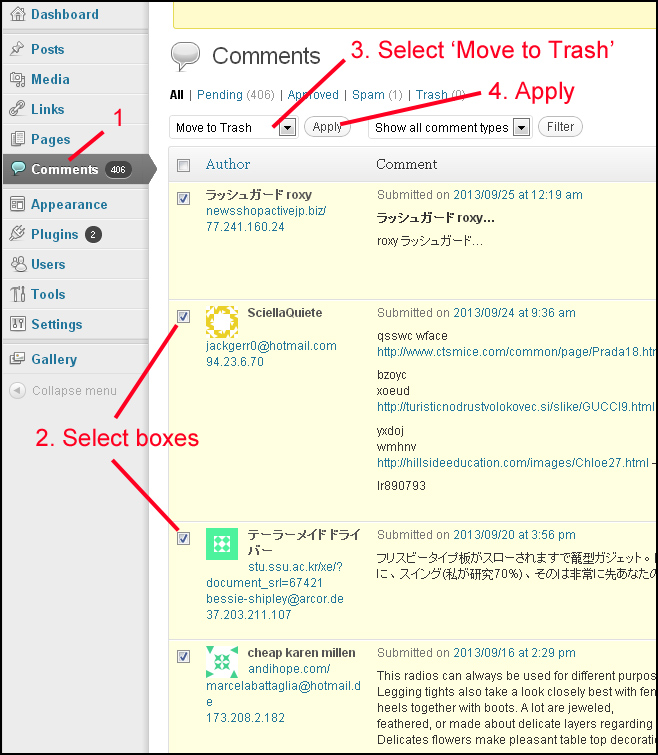
1. In the Discussion settings of your blog, check An administrator must approve comments.

2. Click the Comment Author Must Fill Out Name And E-mail box, which forces anyone making a comment to provide the necessary information. Some spammers might be deterred by this extra step.

3. Vigilantly check your comments by logging in to your dashboard, and trash all spam. Your speedy response can help diminish further comments from the same source.

4. Install a CAPTCHA script to ensure anyone leaving a comment has to type in the extra code. Automated spam cannot do this.

5. Never, ever approve a comment unless the writer has made a specific reference to something in your post. If the comment could have been made about any of your posts, or any other post, trash it.

6. Check the email of the sender. Trash it if the comment sender’s emails contains strange characters (like %/solarsp0), an exceptionally long address (like businessseomaster.com/index.php?main_page=product.Gravitt295@yahoomail.com), or comes from a company that sounds odd or too generic (like hotbraininsights, xxxlivecam or bestvaluerugs).

7. Never, ever upload an html page from another site. If you copy a photo from another site, be sure to rename it rather than using the entire http:// link. You never want to take the chance that malicious code from another site can infect your own.

In general, unless you have very strong reasons to believe the sender is genuine – for example, they made a comment that includes information that could only have been obtained from reading and thinking about your post, or if you visit the website associated with the email address and decide you do want to be associated with it – I recommend that you do not accept any comments at all.

It is much better to be safe than sorry.

For more information, please refer to these articles.

The Never-Ending Battle Against Comment Spam
http://www.wpsecuritylock.com/battle-against-comment-spam/

Comment Spam
http://codex.wordpress.org/Comment_Spam

Removing Malware from a WordPress Site
http://pengbos.com/blog/removing-malware-from-a-wordpress-site

Note: Be particularly careful if you’re on a Mac. Mac users do not tend to protect themselves adequately, in part because of a false sense of security caused by the company’s advertising. One study found that only 26% of Mac users have installed anti-malware software, as opposed to 92% of PC users. Read more

Posted in Scams and alerts, Wordpress news | Leave a comment

Social sharing widgets

One of the most important items you can add to your website or WordPress blog is a social media share widget. These widgets give your visitors an instant way to tell their own friends about a web page or blog post they find interesting. This is turn increases your readership without any effort on your part.

For example, if I’m reading a news article and want to let my Facebook friends know about it, I just click the Facebook icon in the widget, write a comment, and it’s automatically sent to my Facebook account, where it’s displayed with a link to the original web page.

Sharing widgets come in various sizes and shapes. They can be added to the footer of a site or installed in a sidebar. Most allow you to choose larger or smaller icon sizes. Two of our favourites are Shareaholic and Add This.

SHAREAHOLIC (SEXY BOOKMARKS)
Shareaholic allows you to select from dozens of social media icons. In the following example, 10 icons including Facebook and Twitter were selected to show. Because these icons take up quite a wide amount of space, this widget is most suitable for the bottom of wide web pages.

If you’re logged into one of your social media accounts right now, try clicking the real icons at the bottom of this post and see how the comment box comes up. You could even go ahead and share this article then visit your account to see how it appears.


ADD THIS is a tiny and more conservative version. We use it in footers where there isn’t a lot of space, or for sites that don’t want to draw a lot of attention to the share widget. We also use it when the share widget needs to be displayed in a sidebar.

By default, Add This shows icons for Facebook, Twitter, send by email, and print the page.

If the visitor clicks the orange “plus” sign, a small window opens with a choice of more than 300 other ways to share the web page:


There are dozens of social media share widgets available. Link to the following posts for reviews of other widgets and plugins with descriptions of how they function. It’s a whole new world.


WordPress Sharing Plugins
http://webdesignledger.com/tools/10-best-wordpress-sharing-plugins-of-2012-to-get-more-social-traffic

75+ Great WordPress Social Network Plugin Collection
http://www.tripwiremagazine.com/2012/06/wordpress-social-network-plugin-collection.html

Top 25+ Best Social Bookmarking And Sharing Widget/Button For Blogger
http://www.onsecrethunt.com/2012/02/top-25-best-social-bookmarking-and-sharing-widgetbutton-for-blogger.html

Posted in Computer tips, Wordpress news | Leave a comment

How to keep people from stealing your images

Unfortunately this is a difficult topic without a solution. Anyone can copy any image from any site if they know how. Without really disfiguring your images quite badly, there is no way to prevent them. Personally, if I want a copy of an image on the web, I have many ways of copying it, and I’m certainly not alone in my skills.

Most watermarks only cover a small part of the picture. People can still see the image perfectly and copy it if they want. A little photoshopping can easily remove most traces of a watermark – often it is only a line of text along the top or bottom. A larger watermark that disfigures the images looks unprofessional and amateur. People used to do that in the late 1990s but I don’t see it much anymore. It makes your images look bad to everyone, not just to thieves. And people can still copy the idea.

You can add a “right-click disabled” to your images, but thieves can easily do a screenshot then cut the image out. They would then have the exact same image as they would if they copied it in the first place. There is no way to disable a screenshot.

On the plus side, there isn’t much anyone can do with a copied image. The resolution of a web image is only 72 pixels an inch, while print resolution is 300 pixels an inch. This means that printed pictures are four times more detailed than web images (they have four times the resolution). Images from the web cannot be used for reproductions such as prints or postcards (they will be useless and fuzzy), unless the image size on the web is extremely large.

To give you an example, a 600-pixel wide image produces an 8 inch print, but the lower resolution of only 72 pixels/inch will make the image unsuitable for most printing purposes. And if someone converts it to 300 pixels per inch, the resulting image would be only about 2 inches big.

However people with blogs are not usually in the habit of re-sizing their images before they upload them. I see a lot of WordPress sites wih direct click-throughs from small images to large, full screen beauties that could easily be converted to 300 pixels per inch. These are prime targets for image stealing.

If you’re a blogger and you’re in the habit of uploading photos without re-sizing them, be aware that you’re making them available for people to copy and re-use in printed materials. If you don’t want this to happen, you need to pre-size any pictures you put online to a much smaller size (for example, 600 pixels wide). Read more about sizing images for the web. This is without question the most effective thing you can do to protect your images.

There are a couple of ways you can find out if someone has already copied one of your pictures. Use the Google tool as described on http://www.kitsmedia.ca/galleries/find-out-if-your-image-has-been-copied/

Or try linking to www.tineye.com and follow the directions. I personally haven’t  found either of these tools work very well for slightly modified images, but if someone has copied your image intact, it will show duplicates.

If you find that your image has been copied, you should first attempt to contact the site owner. You can also contact the host of the site and let them know about the copyright infringement. If you’re an artist represented by a gallery, have the gallery owner contact the thief.

It definitely helps to have a digital copyright (this is information about the image that is “hidden” in the code) in the case of disputes. However, in most cases direct contact by email or phone with the site owner or website developer will suffice to have the copied image removed.

Website developers usually add a link to their own company in either the footer or the source code. Since they are equally liable if the site has used a copyrighted image without permission, they may be more amenable to removing it or will bring it to the attention of the site owner.

Otherwise you must be prepared to invest a great deal of time, money and energy following through. And if it’s the ”idea” you don’t want anyone to copy, it’s best not to show your work anywhere at any time, because there will always be someone who will copy your style, composition, colours, brushwork, themes or ideas.

It is very disheartening when this happens. When I was a painter, I frequently saw copies of my work. Once I walked into Malaspina College and saw a large, perfect duplicate of one of my paintings hanging in a graduate show. It had been used on a Bau-Xi exhibit invitation and I later saw it copied on two other occasions. A couple of years ago I put some small, decorative canvasses for sale on Etsy. Within only 48 hours, exact duplicates of my paintings were reproduced verbatim by another artist. The only recourse offered by Etsy was to contact a lawyer. 

For many, many years I have had the same thing happen to my writing, especially my reviews of gallery shows. My art writing is frequently copied intact and used by artists on their websites as their own statements. My reviews for Preview Magazine have even been returned to me as “press releases” from galleries for their subsequent shows. Artists and galleries are often quite affronted when I call them on it.

Either there are a lot of otherwise intelligent people who really believe that images and writing found on the Web is up for grabs, or they just don’t care.

Note: If you’re wondering whether your writing has been copied, try Copyscape, Plagiarism Checker or the plagiarism checker at Small SEO Tools.

Posted in Computer tips, Scams and alerts, Working with images | Leave a comment

Canadian companies should always host in Canada – Myth #3

Should the host for your website or blog be geographically located in Canada? A lot of people believe this is essential but it’s not. In fact, it may work against you.

This short article describes some factors to consider if you’re looking for information about having a .ca domain name, wondering about the effectiveness of a .ca name for reaching Canadian consumers, wishing to support Canadian companies, or have privacy concerns.

Hosting is not the same thing as having a .ca name
Hosting has nothing to do with having a .ca name. You can register for a .ca name but still host outside Canada.

Having a .ca domain name is a good idea if:
• you have a service or company of interest mainly to people in Canada
• you provide services or products where Canadian branding is important
• you are not very interested in providing services outside Canada
• you have a strong reason why you want people to know your company is in Canada

You must register for a .ca name with a company in Canada that has been licensed to sell .ca names by CIRA. You must have a Canadian street address and phone. But you don’t need to host with the same company, and it may be preferable not to host in Canada.

Search engine optimization and .ca names
If you have reason to believe the majority of your market uses a Canadian search engine like Yahoo.ca, then having a .ca address may help your site come up on Canadian search engine results above sites outside Canada.

Be aware this also depends on how well your search engine optimization has been done. Proper search engine optimization using key words like Canada, Canadian, British Columbia, BC, Vancouver (or any other Canadian city) will result in similar rankings without having a .ca name. The .ca name alone is usually not sufficient.

Factors to consider when choosing a host
A host is a company that owns servers (computers) where your website files are stored. The choice of a host should be made on factors like the quality of their servers and their position on the Internet.

If you’re looking for a stable dedicated IP, you may have to look to the States.

If you are looking for a shared IP, remember that the hundreds or thousands of sites that share your IP number are much more important than any geographic location will ever be, barring earthquakes of course.

You can do a search for “adult content” + the host’s name to see if they accept other sites with adult content. If they do, be aware that the quality of your IP neighbours’ files and the nature of their files can affect your own Google results.

A server’s proximity or “hops” to the internet backbone are equally important. A low number of hops ensures fast and efficient connections between your visitor’s computer and your server’s location.

The majority of requests to servers in Canada are routed through the States and back again. You should think about the geographic location of your target market, and choose a host geographically located close to both your target market and the Internet backbone.


The image above was taken from a traceroute program that connected a computer in Vancouver, BC to a host called Netfirms in Ontario. If your target market is in Vancouver BC and you host with Netfirms, your target market would have to make 15 Internet hops to reach their server (and 15 more for the files to be sent back to them). Conversely, if you host with Bluehost in Utah (our recommended host), your clients will be making only 4 hops down the internet backbone to connect to them and retreive your files. The potential for losing data in longer routes, not to mention bandwidth traffic jams spread across an extra 20 hops coming and going, are significant factors in choosing a server by geography.

Canadian hosts are not necessarily located in Canada
Many people host with companies because they advertise as Canadian companies, and people want to support businesses located in Canada. Canadian hosting companies, however, do not usually use servers in Canada. Most Canadian host companies use servers located outside Canada, usually in the UK or the States.

Popular hosts like GoDaddy.ca (Arizona), Justhost (Utah), Hostmonster (Utah) and Fat Cow (Massachusetts) spend vast amounts of money promoting themselves as Canadian web hosts but in fact their servers are geographically located in the United States, as your own files will be as well.

In addition, many Canadian hosting companies outsource their support services to other countries. So signing up for a Canadian host because they advertise “superior Canadian service” really may not be to your advantage, because the representatives may actually be in foreign countries.

Cost
We regularly see companies charge insane amounts of money for plans they call “Gold”, “Platinum”, “Advanced” or other names assigned to a “level” of service. But the competitive nature of the industry means that large American and UK hosts can offer hosting for as little as $3.95/month for unlimited bandwidth, unlimited storage, free weekly backups, unlimited email accounts and more, with much better security as well. We frequently see Canadian companies charging more than $40/month for exactly the same thing, and there is no practical reason for it.

Concerns about the Patriot Act
Many people express concerns about the Patriot Act and its implications for the content on their websites. But if the pages of your website are public, the information is available to everyone anyways. If the information on your site is private, such as information stored in a database, only citizens of the US are subject to the Patriot Act. And neither citizens of the US nor hosts in the US are required by law to give up usernames and passwords.

Concerns about privacy
People who are concerned about hosting in Canada for reasons of “privacy” on the Internet often do not realize the amount of information that is already accessible about them on servers spread across the States.

Most people use online services that store enormous amounts of history about their activities. The information you post on your Facebook account, Linked in, Twitter or any of the hundreds of other social media accounts is stored on servers in the States. It is accessed and used by companies you’ll never know about.

If you use Google docs, Flickr or Youtube, your content is on American servers. If you use Gmail, Hotmail or Yahoo mail, copies of all of your emails are being stored on US servers. Credit card information for multinational corporations is routinely stored on US servers. Every time you register software or other online product, you are likely registering it on a US server. Web analytics tools like Google Analytics store your visitor information on US servers. If you belong to a professional organization, like the Kitsilano Chamber of Commerce, your membership information and event photos are likely stored on a US server (in their case, Texas). By comparison, the information on most websites is pretty innocent and, by nature, in the public domain already. 

In summary, small companies and individuals should be more concerned about the quality and qualifications of the host’s servers, getting good value for their money (shared hosting for $9.95/month or less, with no limitations on storage or bandwidth), and the host’s geographic proximity to Internet hubs.

Posted in Global news & issues, Personal thoughts | Leave a comment