
Sometimes you might want to add a sidebar item to your WordPress site that doesn’t fit any of the usual widget descriptions.
It’s not very difficult to make a custom widget using the “Available Widgets” Text box.
On your admin panel, go to Appearance then click Widgets. Under the “Available Widgets” list in the centre section, you’ll find one called Text.
Click down and drag it over to the right side where you have your other widgets listed, such as Archives and Links. Once it’s on the right side of the Appearance/Widgets page, you can drag it to the top, middle or wherever you’d like it to appear on your pages.
Next, click on the drop-down arrow beside the word Text to open the widget. You can enter whatever words you like and even add a small picture or a link to another page.
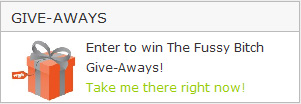 I used this process to make the “Give-Aways” box at the top of the right hand sidebar on The Fussy Bitch. I used html code to insert the image of the gift, typed the words, then used html to add the green link to the Give-Aways page. Very simple!
