
The URL is the web address of your WordPress post or page. It begins with your blog address followed by a string of slashes containing information that identifies each page.
By default, your WordPress posts will have letters, numbers and unpleasant squiggly characters in them, such as http://www.kitsilanowebsites.com/blog/?p=282
If you convert your addresses to words – such as the title of your post – they will be more visually pleasing, more useful to people who bookmark your site, and more identifiable to search engines.
To change this setting, go to Settings/Permalinks on your main menu. Select the last option Custom Structure, as shown in the image below.
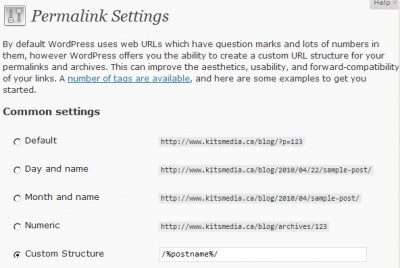
Copy and paste the following code into the box next to Custom Structure:
/%postname%/
Save, then view your pages. You’ll find they are all renamed with the titles of your posts.
